Saymail for iPhone and Android
Your phone buzzed forty times today. Three of them mattered.
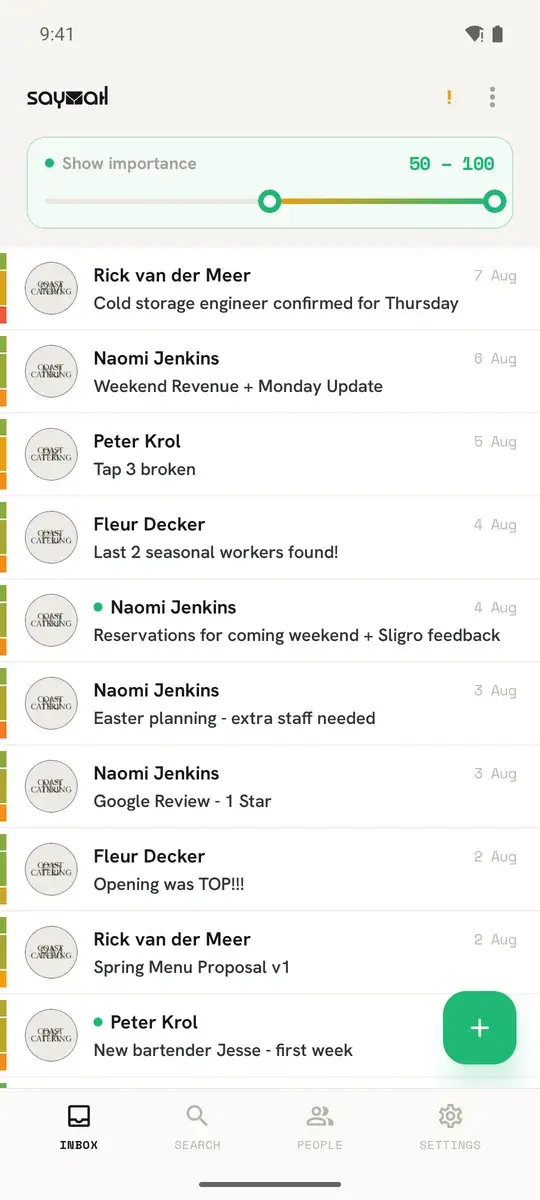
Saymail scores every email the second it arrives and lets only the ones that earn it reach your lock screen. The rest still arrives, it just waits quietly in the app until you have time.*
You stay in charge. Saymail sorts and drafts, you read and send. Nothing goes out without your tap.

Free to install and free to keep. The AI is the only thing that ever costs money.
* On iPhone, for now: every new email in a Gmail or Outlook account notifies you, unfiltered, and other IMAP accounts (including iCloud) show new mail only when you open the app. For those accounts you can switch on instant notifications per account in the app's account settings. The importance filter still works inside the app. Filtered iPhone notifications follow once Apple grants the required permission. Android and desktop already filter.
- Independently security-assessedGoogle CASA Tier 2
- Your mailbox is stored only on your deviceLocal-first storage, cloud AI scoring optional
- Free, with no time limitYou only pay for AI
- Bring your own AIOr run it locally - or use ours
Stay in focus
You set the bar. Saymail holds the line.
Filter your inbox to a score range - say 75 to 100 - and that's all you see. When Saymail isn't in focus, only mail above your threshold is allowed to notify you. Everything else waits quietly until you're ready.*
- 92
- 78
- 22
- 8
* On iPhone, for now: every new email in a Gmail or Outlook account notifies you, unfiltered, and other IMAP accounts (including iCloud) show new mail only when you open the app. For those accounts you can switch on instant notifications per account in the app's account settings. The importance filter still works inside the app. Filtered iPhone notifications follow once Apple grants the required permission. Android and desktop already filter.
The idea
Importance isn't permanent.
Most email matters for a moment, then doesn't. Saymail gives every message three scores - how important it is now, and how that fades - so today's urgent reminder doesn't haunt your inbox next week.
You never write decay rules. The AI decides what's time-sensitive - and you can tell it what should stay important for years.
Rail strike - Tuesday, June 24
Drops to 10 after Jun 24
A strike on a specific date. The impact is immediate but short-lived - the score drops once the strike is over.
Disagree once. It stops making that mistake.
Tap the score, say why it was wrong, and the correction goes into your own classification prompt. No rules to write, no filters to maintain, no folder tree to keep tidy.
What costs money
The email client is free. Only the AI has a price.
Saymail earns nothing from your mailbox. It earns from the AI that reads it - and only if you would rather use ours than your own.
Always free
- Every account and every folder - IMAP, Gmail, Outlook
- Reading, writing, sending, searching
- Rules, profiles, prompts, themes, signatures
- Windows, macOS, Linux and Android
- Every update, forever
Every install starts with 50 AI credits. You get 20 more every week with regular use, once a Gmail or Outlook mailbox is connected. Your balance is in the app under status, any time.
Three ways to pay for AI
Use our AI
from €3.99
One credit buys one AI action: scoring an email, a translation, a draft. Top up whenever you like - credits never expire.
How credits workUse your own AI
€29.99 once
Your own OpenAI, Anthropic, Google, Ollama or OpenRouter key, or a model on your own machine. After that AI never costs you anything through us. Includes no credits.
About the licenceUse it on more than one device
€3.99 a monthor €39 a year
End-to-end encrypted sync between your devices, your own AI included, and 500 credits every month.
About Cloud Sync
This price already includes VAT, and it's the same price in Google Play and the App Store.
What you never pay for: Not per mailbox. Not per device for the free app. Not for updates. Not for support.
Cloud Sync
Teach it once. Every device knows.
Correct a score on your laptop and your phone already agrees. What syncs is what the AI has learned - never the mail itself.
Syncs
Importance scores · your prompts · translations
Never syncs
Your emails · your accounts · your passwords · your contacts
End-to-end encrypted. We hold ciphertext we cannot read.
On your desk
The full workspace lives on your computer.
Saymail started on the desktop and that is still where it goes deepest: a dockable panel workspace you arrange yourself, rules and bulk mailbox maintenance, and an MCP server so Claude or Cursor can work in your mail.
Prefer your own OpenAI, Anthropic or local model? A one-time unlock costs €29.99. What the unlock includes
This price already includes VAT, and it's the same price in Google Play and the App Store.
Why trust Saymail
We'd rather show you proof than ask for praise.
Saymail is new, so we won't put words in a fake customer's mouth. Here is what you can check for yourself - before you spend anything.
Independently security-assessed
Saymail passed Google's CASA Tier 2 assessment - a hands-on review by TAC Security, not a self-graded checklist. It is the bar Google sets for apps that touch sensitive Gmail data.
Google CASA Tier 2 · verified by TAC Security
Your mailbox is stored only on your device
Your mailbox lives in a local database on your own device - we never keep a copy. With Saymail Cloud credits (the default) the text of each new message is sent through our proxy to the AI model provider for scoring. With a model on your own machine (Ollama, requires the Bring your own AI unlock) nothing leaves the device.
Local-first · SQLite on your device
Free, with no time limit
The email client costs nothing: no time limit, no account, no card. Money only enters the picture when you want AI - and even then only if you would rather use ours than your own.
Free forever · every update included
Your AI, your choice
Connect OpenAI, Anthropic, Google, Ollama or OpenRouter, or let it run on Saymail Cloud credits. No lock-in to a single provider, and none to us either.
Bring your own AI · no vendor lock-in
On your desk and in your pocket
A native app for Windows, macOS and Linux, plus native apps for iPhone and Android. Cloud Sync carries everything the AI has learned from one device to the next.
Windows · macOS · Linux · Android · iPhone
One job, done properly
A focused email client: no calendar, no feed, no social layer. It opens on your mail, sorts it, and stays out of the way.
Email only · no bundled clutter
- Google CASA Tier 2
- Local-first
- Free forever
- EU company
- 14-day money-back
Frequently Asked Questions
What is Saymail?
Saymail is an AI-native email client for iPhone, Android, Windows, macOS and Linux. It brings Gmail, Outlook and any IMAP account into one place and scores every message by importance, and by how quickly that importance fades, so the urgent rises and the noise steps back. On Android, notifications follow the score. On iPhone, for now, every new Gmail or Outlook email notifies you unfiltered and other IMAP accounts wait for you to open the app; the importance filter works inside the app.
Is there a phone app?
Yes. Saymail is a native app on iPhone and Android, free like the desktop app, on the same credits and the same plan.
Is Saymail really free?
Yes. The email client has no time limit, needs no account and asks for no card - it is not a limited version that expires. Every account, folder, rule, profile, theme and future update is included. The only thing money buys is AI: our credits, a one-time unlock for your own AI key, or the Cloud Sync subscription. The AI is the separate thing: it runs on the free credits every install starts with, or on your own AI key, or on a local model.
What is a credit, and how many do I get?
One credit pays for one AI request: scoring one email, one translation, one suggested draft. If the request fails, the credit comes straight back. Every install starts with 50 credits, and 20 more arrive every week with regular use, once a Gmail or Outlook mailbox is connected. Credits do not expire, and your balance is in the app under status.
What does Cloud Sync actually sync?
What the AI has learned: importance scores and classifications, your prompts, its notes on senders and accounts, and translations. It never syncs your emails, your passwords or your address book - those stay where they already are. Everything is end-to-end encrypted, so we hold ciphertext we cannot read. You pair a device with a QR code or a 24-word recovery phrase.
Is my data private?
Your mailbox lives in a local database on your own device and we never keep a copy. When the AI runs on Saymail Cloud credits, the text of the message being classified is sent through our proxy to the model provider - that is exactly what the credit pays for, and we use Zero-Data-Retention models. Point Saymail at a local model instead and nothing leaves your machine at all. Optional diagnostics can be turned off in settings.
Fewer interruptions, starting with the next one.
Saymail is free, with no time limit and no account. Download it, connect your mail, and see what a sorted inbox feels like.
See how Saymail compares to ThunderbirdSwitching from Outlook on Mac?